
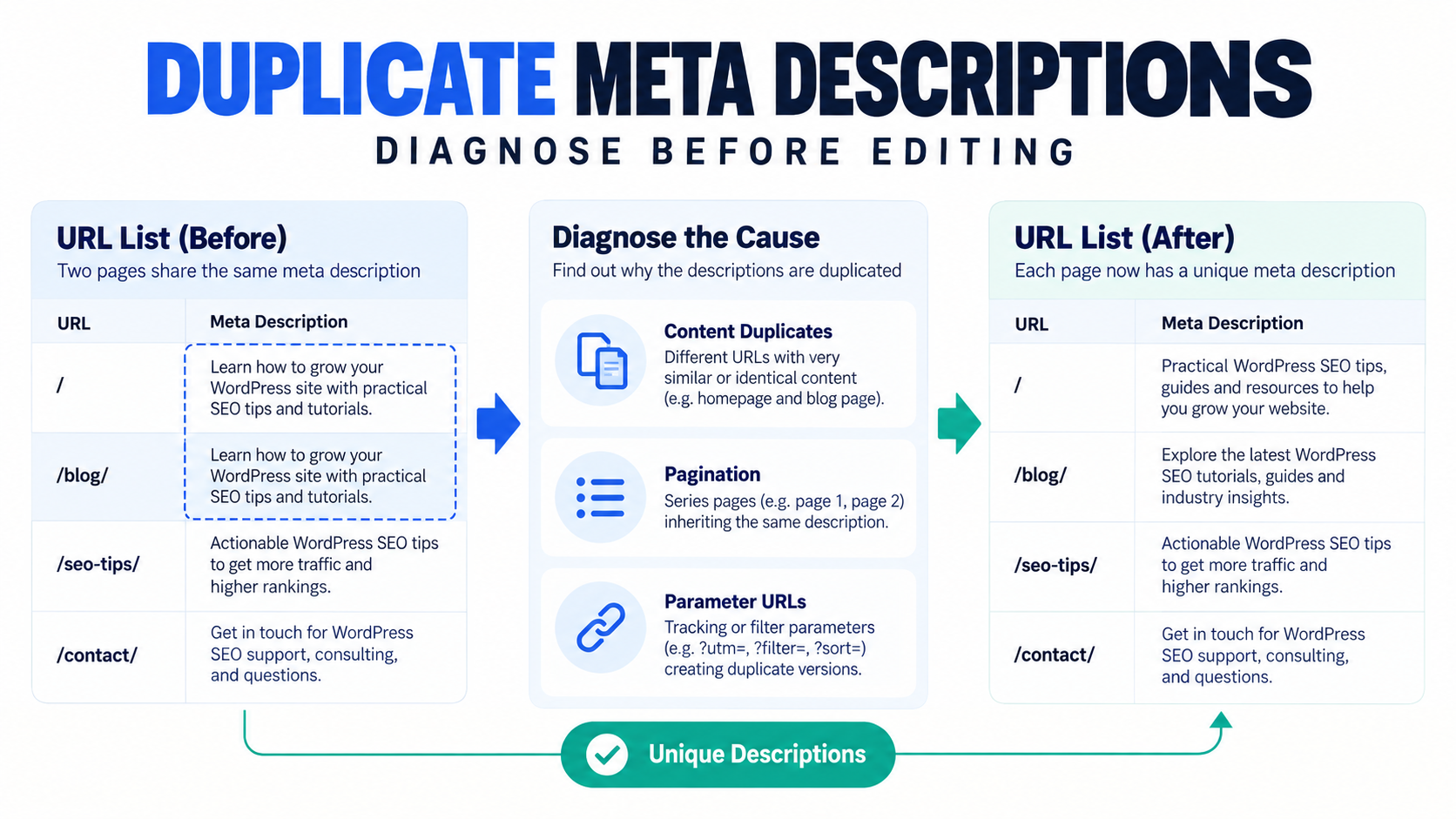
First determine whether the report represents separate pages that need unique descriptions, pagination that needs a page variable, parameter URLs that should consolidate, or genuinely duplicated content. Rewrite metadata only for pages that should remain separate and indexed. Use canonical, noindex, template, or URL-handling fixes when the duplicate is structural rather than editorial.
Duplicate descriptions are a symptom, not one problem
Yoast’s duplicate-meta guidance distinguishes unique URLs, paginated subpages, parameter URLs, and other duplicate URL patterns. See Yoast’s guide to fixing duplicate meta tags. Google also explains that snippets are primarily created from page content and may use the meta description when it better summarizes the page. See Google Search Central’s snippet guidance.
This means that replacing every repeated description is not always the right first action. The URL set and indexation intent must be understood before editing fields in bulk.
Diagnose the cause before editing
| Pattern | Likely cause | Appropriate response |
|---|---|---|
| Two valuable pages use the same hand-written description | Editorial duplication | Write page-specific descriptions and verify each canonical URL. |
| Page 1 and page 2 of an archive repeat metadata | Pagination template | Use the correct page variable or template behavior rather than hand-writing every paginated URL. |
| Tracking or filter parameters produce duplicates | URL duplication | Review canonicals, parameter handling, links, and indexation. Do not solve only the description. |
| Two pages contain substantially the same content | Content duplication | Consolidate, canonicalize, redirect, noindex, or differentiate the pages based on the real intent. |
| The audit tool crawled old cached metadata | Cache or rendering mismatch | Clear relevant caches and inspect the current HTML source before writing. |
| Descriptions are blank and Google creates similar snippets | Missing or weak metadata | Prioritize important indexed URLs and write accurate page-specific summaries. |
Controlled remediation workflow
1. Export or scan the exact URL set
Include canonical URLs, content type, status, SEO owner, current description, and the issue reason. Exclude admin, feed, search, preview, and parameter URLs unless they are part of the diagnostic scope.
2. Group URLs by cause
Create separate queues for editorial duplicates, pagination, parameter URLs, content duplication, and cache anomalies. Only the editorial queue should immediately become a bulk copywriting task.
3. Confirm Yoast owns the field
Keep Yoast active on a site where it owns the metadata. Do not write the same field through multiple SEO plugins or custom code. Bulk SEO Studio works alongside the active compatible plugin rather than replacing it.
4. Write descriptions that summarize the specific page
Use the page’s actual purpose, topic, audience, and differentiator. Do not create keyword lists or mechanically swap one noun across hundreds of otherwise identical descriptions.
5. Review current and proposed values
Load the approved URLs, stage supported description changes, and inspect Preview field by field. Remove accidental blanks, wrong-page mappings, duplicate proposed copy, and rows whose canonical intent changed during review.
6. Save a limited batch with backups
Start with representative post types and templates. Supported writes create snapshots before changes and record the result in History.
7. Verify the HTML and URL behavior
Check the canonical URL, rendered meta description, indexability, response status, and page content after caches are cleared. Remember that a correct meta description does not force Google to show the same wording for every query.
Using Yoast’s native Bulk Editor
Yoast documents a Bulk Editor for updating SEO titles and meta descriptions across supported content types. It is useful when the task is limited to those fields and the editor’s filters fit the job. See Yoast SEO Tools: Bulk Editor. For a spreadsheet handoff, cross-plugin client work, or a workflow that needs complete current-versus-proposed Preview, backups, History, and Undo, a controlled implementation layer may be a better fit.
Related resources
- Bulk edit Yoast titles and descriptions
- Find missing and duplicate metadata
- Find & Fix
- Preview, backups, History, and Undo
Sources
- Yoast: How to fix duplicate meta tags
- Yoast: SEO Tools Bulk Editor
- Google Search Central: Control your snippets
Frequently asked questions
Are duplicate meta descriptions a Google penalty?
Do not frame them as an automatic penalty. They are a quality and clarity problem and can signal duplicated URL or content patterns that deserve investigation.
Should every indexed page have a unique description?
Important pages should have accurate page-specific descriptions where practical, but first confirm that each URL should remain separately indexed.
Can Yoast fix pagination duplicates automatically?
Yoast documents using the page-number variable for paginated title-template issues. Check the current plugin settings and rendered output for your specific archive.
Can Bulk SEO Studio find duplicate descriptions?
Find & Fix can flag deterministic duplicate metadata conditions and hand selected URLs to Bulk Editor. It does not decide the copy strategy.
Will Google always display the new description?
No. Google may generate a query-dependent snippet from the page content.
Move diagnosed URLs into a controlled editing workflow
Find deterministic issues, approve page-specific replacements, Preview the batch, and verify public output.