
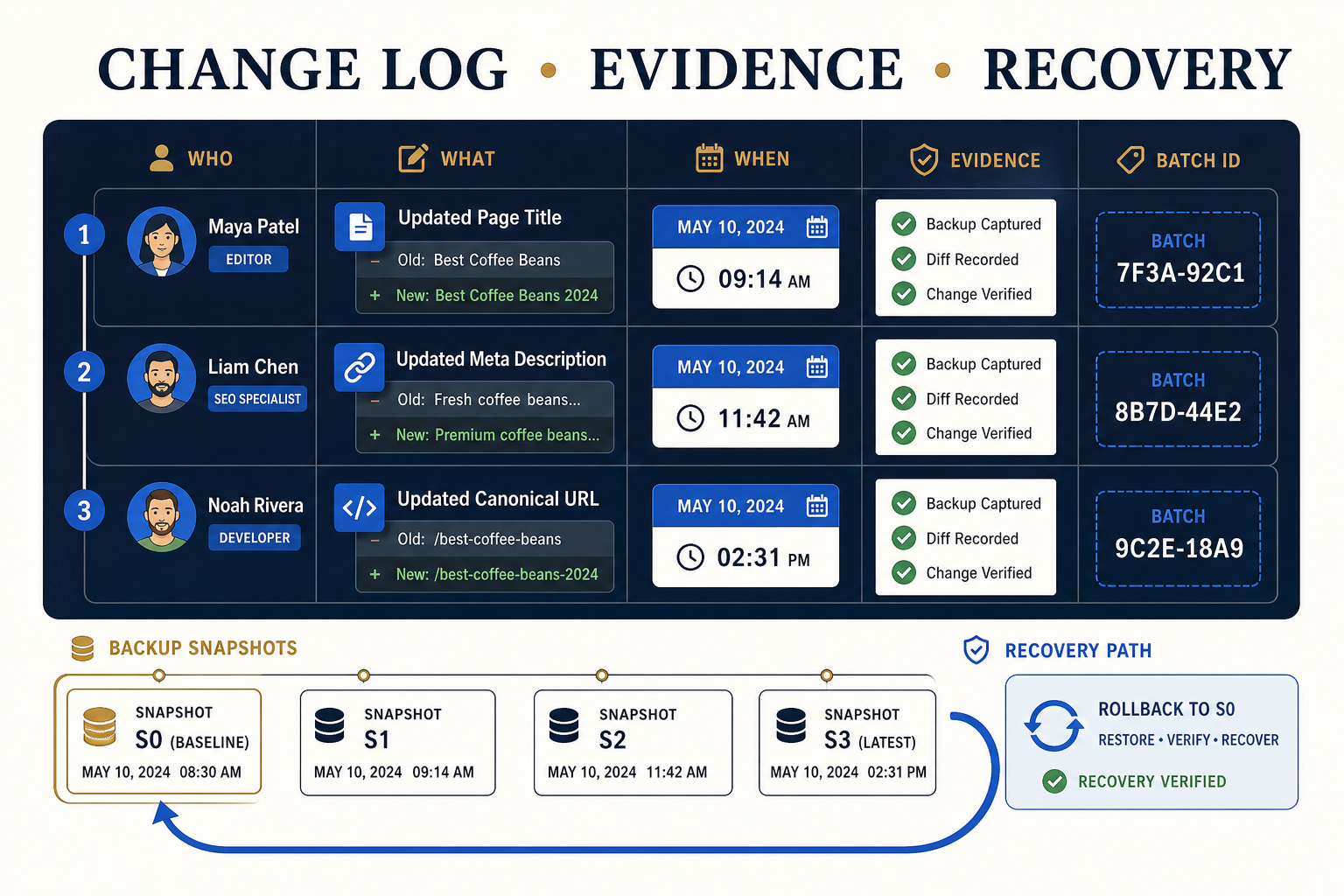
Record who approved and implemented the change, when it happened, the exact URLs and fields, current and proposed values, the reason, the batch or release reference, verification evidence, skipped or failed items, cache actions, and any rollback or follow-up decision.
A change log connects strategy to production evidence
SEO work often crosses an audit, spreadsheet, client approval, WordPress implementation, cache layer, and later performance review. Without a shared log, teams can see that a page changed but not why, who authorized it, whether the public output was verified, or how to return to the previous value.
The log should stay concise enough to maintain. Use one release-level record for the batch and row-level detail only where the exact URL or field matters. Bulk SEO Studio History can provide implementation evidence for supported writes, while a project log adds business context, approval, QA, and follow-up decisions.
Minimum change-log fields
| Field | Purpose | Example |
|---|---|---|
| change_id | Stable reference across tools | SEO-2026-08-31-03 |
| responsibility | Defines one kind of change | Approved meta descriptions |
| urls_or_scope | Identifies affected content | 18 product pages |
| fields | States what was eligible to change | SEO title, meta description |
| approved_by | Records authority | Content lead |
| implemented_by | Records operator | SEO specialist |
| implemented_at | Anchors cache and analytics review | 2026-08-31 14:20 PKT |
| before_after_source | Points to exact values | Approved CSV plus History batch |
| verification | Records public QA | 5 representative URLs passed |
| exceptions | Keeps skipped or failed rows owned | 2 unmatched URLs returned to review |
| recovery | Records restore action or readiness | Batch 41 available in History |
Separate four kinds of evidence
Approval evidence
Approval answers whether the team had authority to make the change. Link the dated spreadsheet view, ticket, or documented decision. Avoid vague labels such as “client approved” without a date or source.
Implementation evidence
Implementation evidence answers what WordPress accepted. Record the exact field set, page count, batch identifier, operator, time, skipped items, and save result. For supported Bulk SEO Studio writes, History records the user, pages, fields, and recovery snapshots.
Verification evidence
Verification answers what went live. Keep representative URLs, checked output, device or template coverage, validation tools used, cache actions, and the person who accepted the result. A screenshot can help, but a URL and structured note are easier to revisit.
Outcome evidence
Outcome evidence answers what happened later. Record Search Console, analytics, conversion, support, or editorial observations in a separate review window. Do not claim that a ranking change came from one implementation when other releases and external factors overlap.
Recommended workflow
1. Create the change ID during planning
Assign the identifier before approval so the spreadsheet, task, WordPress batch, QA notes, and later performance review refer to the same release.
2. Record current and proposed values
Store exact values for fields that need traceability. For a large batch, link a dated approved CSV rather than pasting every title into a project ticket. Protect access if the sheet contains private or unpublished information.
3. Link approval to the implementation scope
Confirm that approved rows match the URLs and fields entering Preview. If the implementation scope changes, create a revision or new change ID instead of silently expanding the original approval.
4. Add the WordPress batch reference
After saving, record the History batch identifier, completed pages, skipped rows, failed rows, and any resumed chunks. Pre-write snapshots are recovery evidence for the supported changed fields, not a complete site backup.
5. Add public QA evidence
Record the representative sample and what was checked: rendered metadata, visible headings, JSON-LD, internal links, responsive layout, or cache state. Name exceptions and give each one an owner and next action.
6. Record restoration without deleting the original event
A rollback is another event, not an erasure. Keep the original change, the reason for restoration, the person who authorized it, the restore result, cache actions, and final verification. This preserves the full decision trail.
7. Schedule an outcome review
Choose a review window appropriate to the change and available data. Search Console reporting can lag, and low-volume pages may need more time. Compare groups carefully and avoid treating impressions, clicks, or rankings as guaranteed outcomes of a single field edit.
A lightweight status model
| Status | Meaning | Next owner |
|---|---|---|
| Planned | Scope exists but values are not final | Strategist |
| Approved | Values and authority are frozen | Implementer |
| Published | WordPress accepted the confirmed batch | QA owner |
| Verified | Representative public output passed | Project owner |
| Exception | A row was skipped, failed, or conflicted | Named specialist |
| Restored | Supported values returned to an earlier snapshot | QA owner |
| Reviewed | Outcome window was evaluated | Strategist or analyst |
Mistakes that make logs unreliable
- Using one ticket for unrelated responsibilities and releases.
- Recording only the final value and losing the before state.
- Calling a database save “verified” without checking public output.
- Removing failed rows from the log instead of assigning them.
- Treating History snapshots as a full hosting backup.
- Deleting the original record after rollback.
- Claiming causation from a short-term ranking movement.
- Storing credentials or sensitive personal data in the change log.
Related resources
- WordPress SEO implementation checklist
- QA bulk SEO changes after publishing
- Preview, Backup, History and Undo
- History and Undo documentation
- Safe implementation guide hub
Frequently asked questions
Is WordPress revision history enough for an SEO change log?
No. Revisions can help with supported post content, but a project log also needs approval, field ownership, QA, exceptions, cache actions, and outcome review.
Does Bulk SEO Studio History replace the project log?
No. History records supported implementation and recovery evidence. The project log adds business reason, approval, QA, and later outcomes.
Should every URL have a separate log entry?
Not always. Use a batch-level record plus an attached approved file, then create row-level exceptions where exact detail matters.
How should rollback be recorded?
Keep the original change and add a restoration event with the reason, authorization, restore result, cache actions, and final verification.
Can the log prove that a change improved rankings?
It can establish timing and scope, but it cannot by itself prove causation. Review Search Console and other evidence with appropriate controls and time windows.
Sources and verification
- WordPress documentation: Revisions
- Google Search Console: Performance report
- Google Search Central: Get started with Search Console
Editorial note: This operational framework was reviewed against the documented Bulk SEO Studio History and Undo workflow plus the linked WordPress and Google guidance on 31 August 2026.
Keep every implementation accountable
Connect approval, exact changes, public QA, exceptions, and recovery evidence in one practical release record.
Explore History and Undo