
Product behavior and external claims reviewed August 29, 2026. Review methodology.
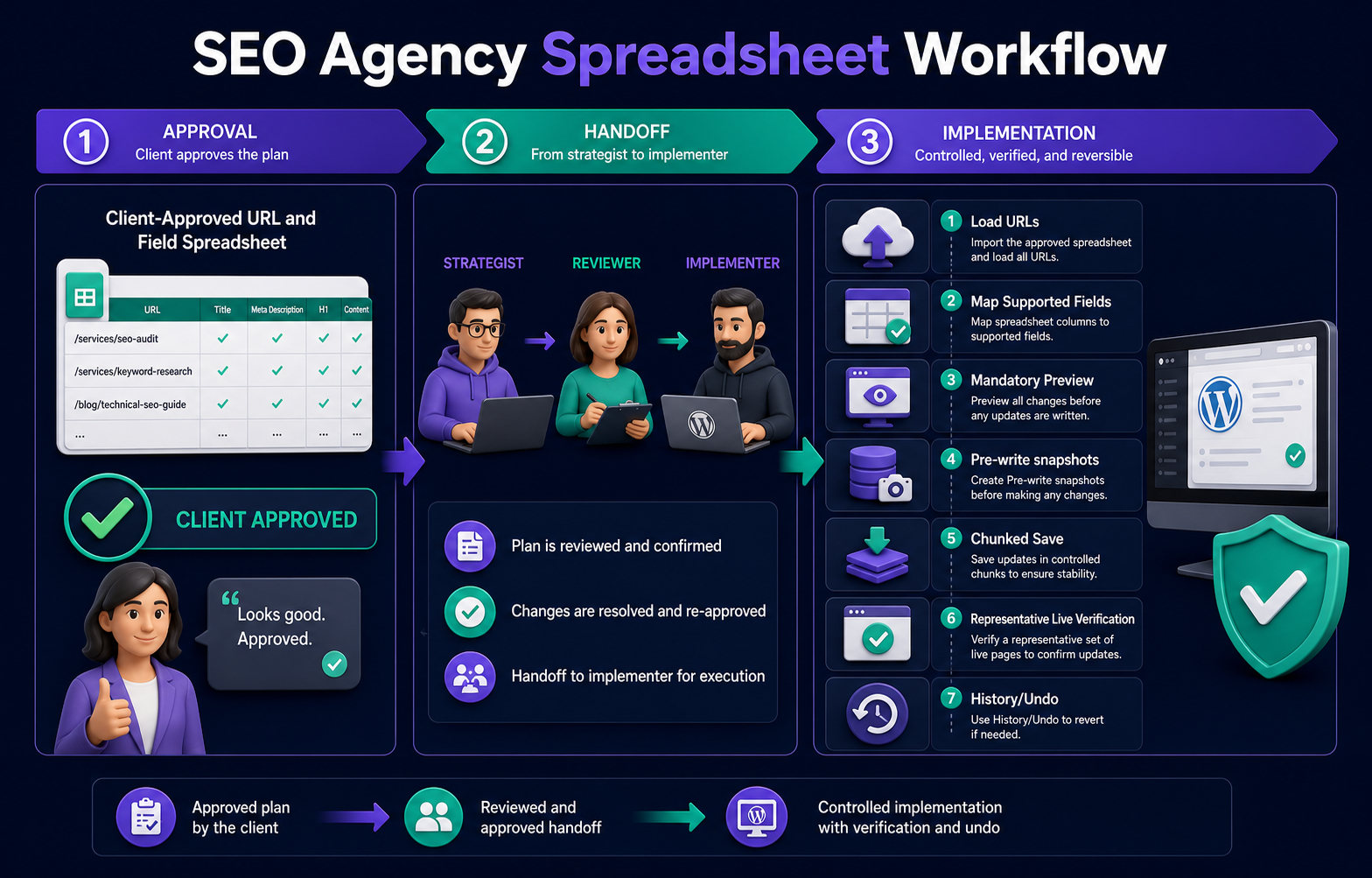
Use one approved row per URL, separate current and proposed values, assign owners and status, hand off only final supported fields, re-check WordPress before implementation, map the CSV deliberately, inspect mandatory Preview, save in chunks with pre-write snapshots, and verify representative live pages.
The spreadsheet is a control layer, not the database
Agency spreadsheets are useful for research, client review, comments, and approvals. WordPress remains the live source of truth. A strong workflow makes the transition between those systems explicit instead of treating every filled cell as permission to write.
| Role | Primary responsibility | Approval evidence |
|---|---|---|
| Strategist | Proposes the URL-level SEO change | Reason and intended outcome |
| Reviewer | Checks accuracy, intent, and policy | Reviewed status and notes |
| Client or owner | Approves business-facing changes | Approved status and date |
| Implementer | Maps only final supported fields | Preview and batch record |
| QA owner | Checks representative live output | Verification notes and exceptions |
Recommended spreadsheet structure
| Column | Use | Write to WordPress? |
|---|---|---|
| url | Canonical target URL | Used for matching |
| field | Human-readable responsibility | No |
| current_value | Value observed during audit | No |
| approved_value | Final client-approved replacement | Only through a supported mapped column |
| owner | Person responsible for the row | No |
| status | Draft, Review, Approved, Implemented | No |
| verification_notes | Live QA result and exceptions | No |
For direct CSV mapping, many teams use separate supported columns such as seo_title and meta_description rather than a long-form field/value layout. Keep the broader handoff sheet for governance and produce a clean implementation worksheet from its approved rows.
Controlled implementation process
1. Freeze an approved implementation view
Filter to approved rows, resolve comments, and create a dated version. Do not import a working sheet that still contains alternatives or unresolved feedback.
2. Refresh current WordPress values
Scan the target URLs again before writing. Escalate conflicts where the live value changed after approval instead of silently overwriting newer editorial work.
3. Map only supported fields
Use exact URL matching and deliberate destination mapping. Unmatched URLs, ambiguous rows, and unsupported fields should be skipped and reported.
4. Inspect mandatory Preview
Review each affected URL and field as a before-and-after comparison. Approval belongs at field level because one row can contain both safe and uncertain changes.
5. Create pre-write snapshots and save in chunks
Confirmed supported writes create recovery snapshots. Process a representative batch first, then continue in controlled chunks so failures and cache issues remain easy to isolate.
6. Verify live output
Check a representative set across post types, templates, and plugins. Inspect rendered titles, metadata, headings, schema, or links according to the batch responsibility. Clear relevant caches when output is stale.
7. Record results and exceptions
Mark verified rows as implemented, document skipped items, and return exceptions to the strategist or client. History and Undo provide recovery, but they do not replace a clear handoff record.
Common agency workflow failures
- Importing a strategy sheet before client approval.
- Overwriting pages changed after the audit.
- Mapping blank cells without deciding whether blank means remove or ignore.
- Combining unrelated responsibilities into one oversized batch.
- Assuming every SEO plugin stores fields the same way.
- Calling snapshots a full-site backup. They cover supported pre-write values, not the complete installation.
- Finishing when the database changes instead of verifying public output.
Related resources
- Bulk SEO Studio for agencies
- Implement SEO audit recommendations
- Safely bulk edit WordPress SEO
- Spreadsheet import feature
- CSV and spreadsheet guide hub
Frequently asked questions
Should the client edit the implementation CSV directly?
Usually the client approves a review view, while the implementer creates a clean CSV containing only approved supported fields.
Are snapshots a full WordPress backup?
No. They preserve supported pre-write values for the confirmed batch. Maintain normal site backups separately.
How should conflicts be handled?
Pause the affected row when WordPress changed after approval and ask the responsible reviewer to confirm the final value.
Can an agency undo a batch?
Supported changes recorded in History can be restored through Undo. Verify restored public output afterward.
Should all approved rows be saved at once?
Start with a representative batch, verify it, then continue in controlled chunks.
Turn approved SEO work into a controlled handoff
Give strategists, clients, implementers, and QA owners a clear workflow with Preview and recovery.
Explore the agency workflow