
Product behavior and external claims reviewed August 29, 2026. Review methodology.
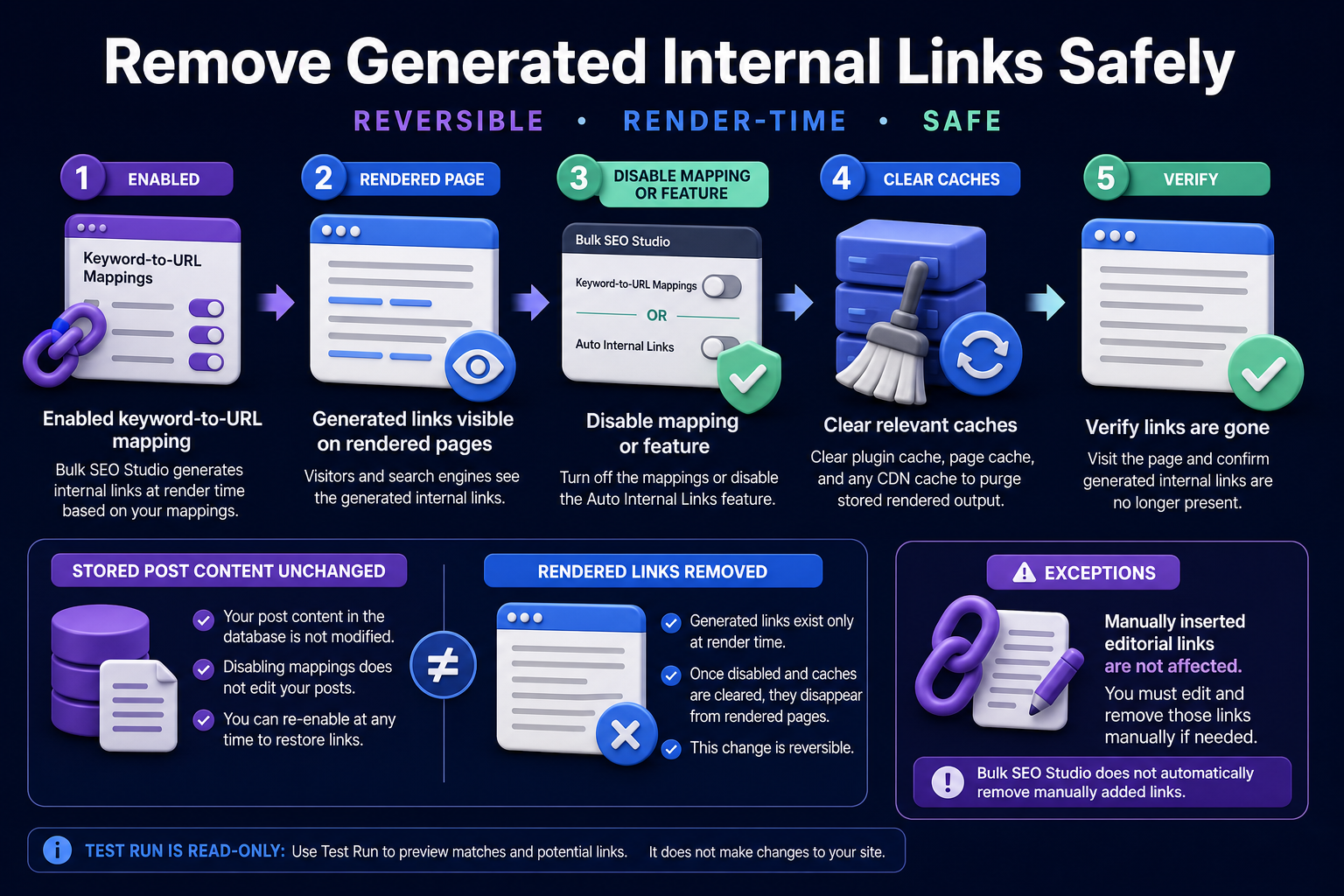
For links generated by Bulk SEO Studio at render time, disable the relevant keyword-to-URL mapping or the Internal Linking feature, save the configuration, clear relevant caches, and verify representative live pages. Stored post content remains unchanged. Manually inserted editorial links are separate and must be removed from the post or block where they were saved.
First identify how the link was created
Removal depends on ownership. A link can exist in stored WordPress content, a template, navigation, a page builder, custom code, or render-time output. Do not start with database replacement until you know which system owns the anchor.
| Link source | Where it exists | Correct removal path |
|---|---|---|
| Bulk SEO Studio generated link | Rendered eligible content | Disable or remove its mapping, then clear caches |
| Editorial Gutenberg link | Stored block content | Edit the post and remove the anchor |
| Elementor link | Widget or template data | Edit the owning Elementor widget or template |
| Navigation link | WordPress menu or header template | Edit the menu or template |
| Theme or custom-code link | PHP, shortcode, hook, or component | Change the owning code safely |
Safe removal workflow
1. Confirm the link is generated
Open the page source or inspect the post editor. If the public anchor is absent from stored content but matches an active keyword-to-URL mapping, it is likely render-time output. Check the Internal Linking configuration and Test Run context.
2. Choose the narrowest removal
Remove one mapping when only a keyword or destination is wrong. Disable the feature when the complete generated-link layer should stop. A narrow change preserves unrelated approved mappings.
3. Save the configuration
Saving updates the active configuration and link-cache version. The stored post body is not rewritten because generated links are applied while eligible pages are rendered.
4. Clear every relevant cache
Purge the plugin link cache, WordPress page cache, server cache, optimization cache, and CDN cache used by the site. A stale cached response can continue showing an anchor after the mapping is disabled.
5. Verify representative pages
Check pages where the mapping previously passed, pages where it was skipped, and pages using different templates. Confirm the anchor is gone while surrounding text and editorial links remain intact.
6. Document the removal
Record the mapping, destination, reason, date, and pages checked. If the mapping may return later, retain its approved rule outside the active configuration rather than recreating it from memory.
When links still appear
- A page cache or CDN still serves an older rendered response.
- The same keyword is covered by another active mapping.
- The link was manually inserted into Gutenberg or Classic content.
- An Elementor widget, template, menu, or theme component owns the link.
- Another internal-linking plugin is generating the anchor.
- A browser cache or optimization layer is serving stale HTML.
What Test Run can and cannot do
Test Run is read-only. Use it to inspect eligible matches, proposed destinations, context, limits, passes, and skips. It does not insert or remove links. Actual generated output follows the saved enabled configuration and current cache state.
Related resources
- Bulk Internal Linking feature
- Internal Linking documentation
- Preview links before enabling
- Internal links without rewriting content
- Internal linking guide hub
Frequently asked questions
Does disabling generated links edit post content?
No. Bulk SEO Studio generated links are applied to rendered eligible content, so stored post content remains unchanged.
Why is a link still visible after I removed the mapping?
Clear the plugin, page, server, optimization, and CDN caches that can preserve an older rendered response.
Will this remove links added manually by an editor?
No. Editorial links stored in Gutenberg, Classic, Elementor, menus, or templates must be removed in their owning system.
Can I remove only one generated destination?
Yes. Remove or disable the narrow mapping instead of disabling the complete feature.
Does Test Run remove links?
No. Test Run reports potential placements without changing the site.
Keep generated internal links reversible
Review mappings, Test Run exact context, and remove generated output without rewriting stored posts.
Explore Internal Linking