
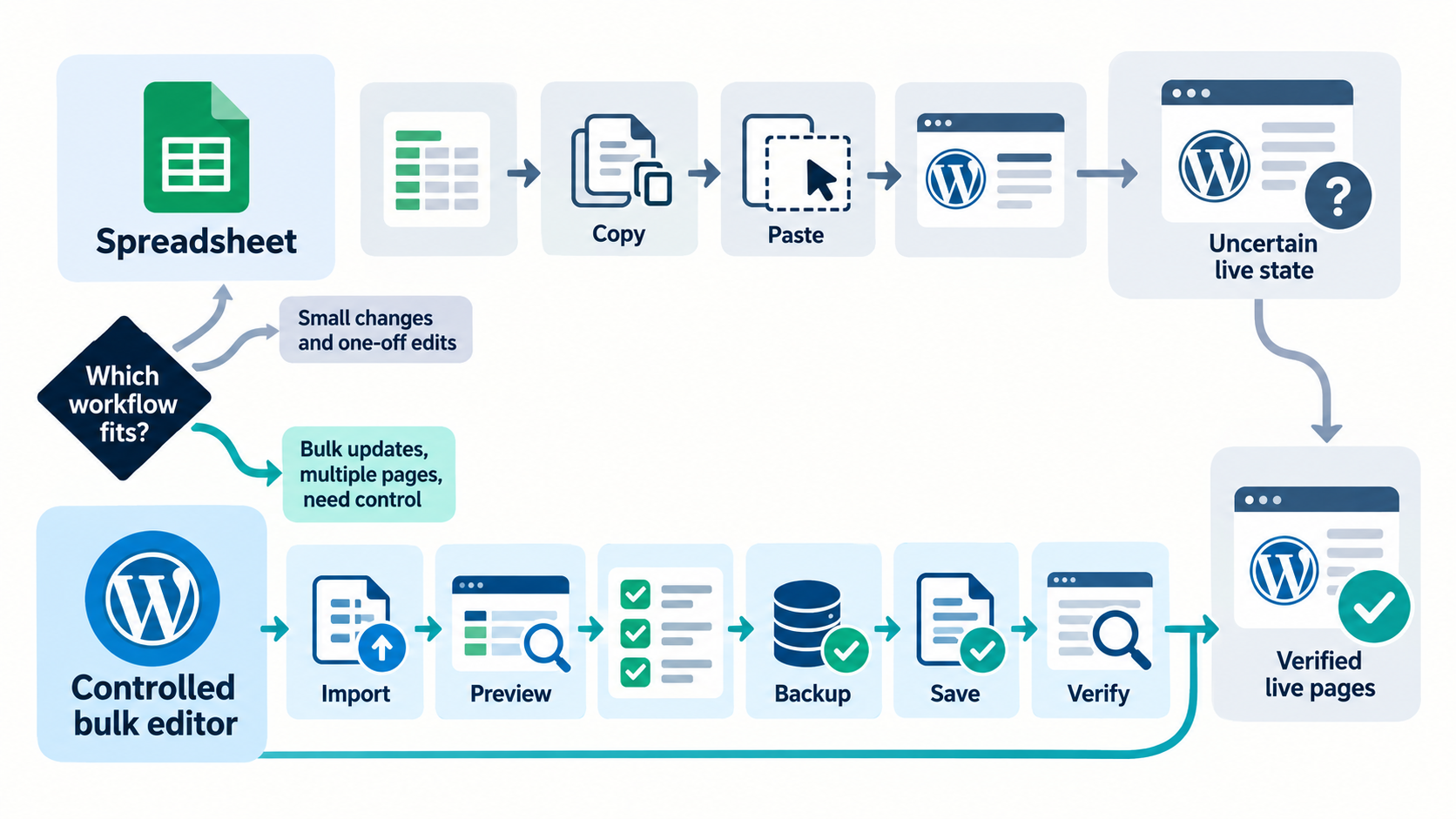
Use a spreadsheet for research, collaboration, approval, ownership, and exception tracking. Use a controlled WordPress bulk editor for matching approved values to live records, Previewing exact changes, saving supported fields, creating recovery points, and reporting results. For most agency and in-house workflows, the strongest process combines both.
The tools are strongest at different stages
A spreadsheet is easy to share, sort, comment on, and enrich with business context. It is a good approval surface because strategists, writers, clients, and developers can work without WordPress permissions. However, a spreadsheet does not know whether a URL still exists, which plugin currently owns a field, whether a builder stores an H1 inside structured data, or whether a live value changed after export.
A WordPress bulk editor works closer to implementation. It can read live records, expose supported fields, compare current and proposed values, enforce permissions, write through documented integrations, and retain a change history. It is not a replacement for editorial strategy, stakeholder approval, or a full project workbook.
Decision table
| Need | Spreadsheet | Controlled bulk editor |
|---|---|---|
| Keyword and competitor research | Strong | Not the primary purpose |
| Client comments and approval | Strong | Use only if the client belongs in WordPress |
| Stable URL and proposed-value handoff | Strong when columns are protected | Strong when mapped and Previewed |
| Know the current live field owner | Can become stale | Can inspect supported live integrations |
| Preview exact current-to-proposed changes | Possible but manually maintained | Core workflow |
| Write supported fields | Cannot write by itself | Core workflow |
| Backup and Undo | Preserves copy, not the full write state | Supported writes can retain snapshots and History |
| Track unsupported exceptions | Strong | Should report and skip rather than guess |
| Verify public output | Can record results | Still requires live-page checks |
The recommended handoff model
1. Research and segment
Build the opportunity set from Search Console, analytics, crawl data, customer questions, sales objections, and page purpose. Segment by content type, funnel stage, metadata owner, template, and risk. Do not begin by filling thousands of rows with generated copy.
2. Create an evidence column
For each proposed change, record why it exists: query demand, weak click-through rate, mismatch with the page, duplicate metadata, missing field, product correction, or an approved campaign. Evidence makes review faster and prevents arbitrary rewrites.
3. Preserve observed and proposed values
Keep current title, current description, proposed title, and proposed description in separate columns. Add full URL, post ID when available, content type, active SEO owner, approver, status, and notes. Protect source columns from accidental overwrite.
4. Approve by exception
Use explicit states such as approved, revise, hold, already correct, unsupported, redirected, and out of scope. A blank status is not approval. A blank proposed value is not automatically a deletion request.
5. Export a clean implementation CSV
Include only approved rows and supported columns. Use UTF-8 CSV, preserve complete URLs, and avoid formulas in the implementation file. Retain the richer planning workbook separately.
6. Match, map, and Preview in WordPress
Resolve unmatched URLs, map only documented fields, and compare every current and proposed value. If the live value changed after approval, return the row for review instead of overwriting newer work.
7. Save representative batches
Begin with a small set covering each plugin, builder, post type, and template. Confirm backups, permissions, completed rows, skipped rows, and failures. Increase batch size only after public output passes verification.
8. Verify and close the loop
Inspect rendered title elements, descriptions, headings, canonicals, schema ownership, status codes, and caches. Record the result in the workbook so the approval artifact becomes a reliable implementation record.
A 12-URL example
An agency receives approved metadata for twelve service pages. Ten are standard pages using Rank Math, one is a redirected old URL, and one is an Elementor landing page whose H1 is outside the free heading boundary. The spreadsheet is ideal for approval and exception notes. The bulk editor should match and Preview the ten supported metadata rows, skip the redirect, and route the builder heading to the correct Pro workflow or manual owner.
This is better than forcing all twelve rows through one generic import. The value of a controlled workflow is not only faster writes. It is making uncertainty visible before the write.
When a spreadsheet alone is enough
- The project is research or approval only and no implementation was requested.
- The WordPress site is not yet available.
- Every change will be entered manually by a page owner.
- The required fields are unsupported and belong to a custom integration.
- The work is a migration plan rather than an immediate write.
When a native plugin bulk editor may be enough
If the job is limited to one plugin’s titles and descriptions, its native tool may be the shortest path. Yoast documents a title and description Bulk Editor, and Rank Math documents several bulk-edit routes. Review Yoast Bulk Editor documentation and Rank Math bulk editing documentation. Choose the smallest workflow that still gives the project the review and recovery controls it needs.
Why not generate and publish thousands of variants?
Google’s spam policies identify scaled content abuse as generating many pages primarily to manipulate rankings rather than help users. Its current AI features guidance says the same SEO fundamentals apply and emphasizes unique, non-commodity value. See Google spam policies and Google guidance for AI features. A spreadsheet makes scale easy, but scale still needs purpose, accuracy, review, and differentiated page value.
Product boundary
Bulk SEO Studio Free supports the core controlled editing workflow within its documented boundaries. Pro is the appropriate route for supported CSV import and more advanced implementation capabilities. It does not import native XLSX workbooks, invent support for unknown columns, replace the active SEO plugin, or guarantee Google search presentation.
Related resources
- CSV import and export workflow
- SEO agency spreadsheet workflow
- Export WordPress SEO data to Google Sheets
- Preview, backups, History, and Undo
Frequently asked questions
Can I upload an Excel file directly to Bulk SEO Studio?
No. Preserve the workbook for planning, then export the approved implementation sheet as a supported UTF-8 CSV.
Should the spreadsheet include current values?
Yes. Current and proposed values should be separate so reviewers can understand the change and detect stale approvals.
Can a bulk editor replace client approval?
No. Approval is a business and editorial control. The bulk editor implements the approved scope and exposes technical exceptions.
What happens to unmatched or unsupported rows?
They should remain visible as exceptions and be skipped or routed to the correct owner, not forced into an uncertain write.
Is bulk publishing AI-generated metadata safe?
Automation is not a quality exemption. Every value should be accurate, useful, page-specific, reviewed, and consistent with Google spam policies.
Start with the controlled core workflow
Download the Freemius-managed Free build. When your approved handoff requires supported CSV import, the same product has a direct Pro upgrade path.